Most conversations about AI and professional work start in the wrong place. They ask how much faster the work itself can be done. For anyone running a small practice, that is not where the time goes.
Clio's 2025 Legal Trends Report puts the average law firm utilization rate at 38 percent. Utilization is the share of an eight-hour day that goes to billable work. At 38 percent, five hours of the day are never billed to anyone. Of the three hours that are billable, a realization rate of 88 percent means only 2.6 hours get onto an invoice, and a 93 percent collection rate means only 2.4 hours get paid.
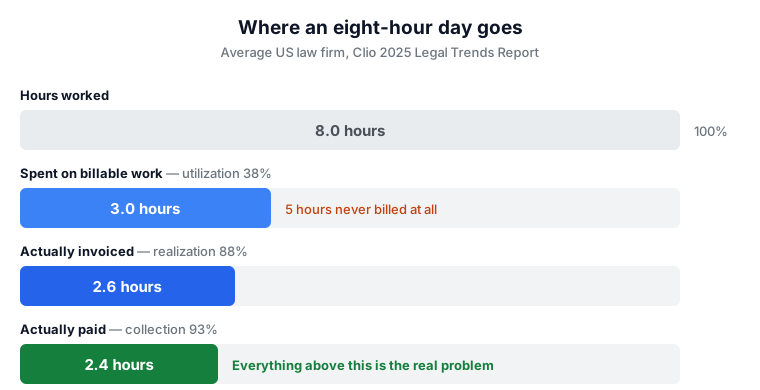
An eight-hour day ends as 2.4 paid hours. The three hours of legal work are not the bottleneck — the five hours around them are. Making the legal work faster improves the shortest bar on the chart. That is the least valuable thing you can speed up.
This is why the honest question is not “what can AI do?” but “which of those five hours is AI any good at?” The answer is narrower than most vendors suggest, and it is worth being specific about.
The line between what AI does well and what it does badly
After enough time watching these tools work and fail, the dividing line turns out to be simple. AI is reliable when it is transforming information that is already in front of it — reading a document and restating it, pulling structured data out of unstructured input, turning a mess into a format. It is unreliable when it has to supply information it was not given, because it will supply something anyway, and what it supplies will look exactly as confident as the true parts.
That single distinction predicts most outcomes. Summarising a contract you uploaded: transformation, works well. Naming the case that supports your argument: supply, fails badly. Extracting the figures from a bank statement: transformation. Telling you whether a clause is enforceable in your state: supply.
A useful rule: if you could in principle check the output against the document you supplied, AI is probably safe to use there. If checking the output would require knowing something that was never in the input, you are in the part where it invents things.
Where it lands in practice: reading what comes in
The first of the unbilled hours goes to reading things. A client forwards a thirty-page agreement and asks whether it is normal. A notice arrives and someone has to work out what it demands and by when. None of this is billable in most practices, and all of it is pure transformation — the document is right there.
This is the part we built our own free legal tools for. The NDA triage tool screens an agreement against market-standard positions and tells you which clauses are off-market; the clause analyzer takes a single provision and explains what it actually does. Neither tells you what to do about it. That is the right division of labour.
Drafting what goes out
The second block of unbilled time is correspondence: the engagement letter, the chasing email, the explanation you have written four hundred times. A first draft from a model is usually 80 percent of the way there, and the remaining 20 percent is the part only you can write.
The catch is that the 80 percent reads so well that it is tempting to stop. Drafts that leave your office carry your name on them. Treat the output as a starting point written by a competent assistant who has never met your client — because that is precisely what it is.
The money half of a one-person practice
The third block is the one nobody trained for. Invoices, receipts, chasing payment, tracking what came in against what went out, and the annual question of whether the practice is actually working. Look back at the chart: the drop from 3.0 billable hours to 2.4 paid hours is entirely an administrative loss. Work was done and never invoiced, or invoiced and never collected.
This is finance admin, not legal work, which means general-purpose tools apply. CalculatorAI is one of the more complete takes on it: you upload a paystub, bank statement or screenshot and it reads the numbers out of the document and fills the matching tool, rather than asking you to retype them. Around that sit invoice, quote and receipt generators that export without watermarks, trackers for income and expenses, net worth and debt payoff, and a large library of calculators — break-even, capital gains, CAC and lifetime value among them.
It is a personal and small-business finance workspace rather than practice management software, so it will not do trust accounting or conflict checks. But for a solo practitioner, a consultant or a freelancer who is doing their own books between matters, the overlap with the unbilled five hours is real. The same logic holds as everywhere else in this article: it is good at reading your documents and arranging the numbers, and the judgement about what the numbers mean stays with you.
Disclosure: CalculatorAI has published an article that links to this site, and this article links back. No money changed hands in either direction, neither site reviewed or approved the other's draft, and nothing here is a paid placement. We looked at the product before writing about it. See our Editorial Standards for how we handle this.
Where this reliably goes wrong
The failure mode is not that AI produces obvious nonsense. It is that it produces something indistinguishable from good work, and the error only surfaces later, in front of someone who matters.
The clearest example is case citations. More than two thousand court filings have now been caught containing authorities that do not exist, complete with plausible names, reporters and page numbers. Judges have struck filings and imposed costs. We wrote about this at length in why courts are punishing fake citations — and the mechanism is exactly the one described above. Asked to supply a case rather than read one, the model supplies.
Second failure: quiet confidence about jurisdiction. Most legal AI, including ours, applies US and general commercial norms by default. Ask about a notice period or a limitation clause from outside that frame and you will get a fluent answer calibrated to the wrong country, with nothing in the tone to signal it.
Third, and least discussed: automation that saves ten minutes but adds a check you now have to perform every time. If verifying the output takes as long as doing the task, you have moved work rather than removed it.
A short test before automating anything
Before handing a recurring task to a tool, run it past four questions. If any answer is bad, the task is not a good candidate, however impressive the demo.
| Question | Why it decides the answer |
|---|---|
| Is everything the tool needs in what I give it? | If it has to supply facts from memory, it will invent them. Transformation is safe; recall is not. |
| Can I tell a wrong answer from a right one at a glance? | If spotting an error takes as long as doing the work, nothing is saved. |
| What happens if a bad output gets through? | An embarrassing email is recoverable. A struck filing or a missed limitation date is not. |
| Does this task actually repeat? | Most of the unbilled five hours is many small recurring jobs, not a few big ones. Automating something you do twice a year is a hobby. |
Applied honestly, this filter rules out a lot. Reading inbound documents passes. Drafting routine correspondence passes with review. Pulling numbers off a statement into a tracker passes. Deciding what a clause means for your client, in your jurisdiction, does not pass and will not pass soon.
What this is really worth
Nothing in this article makes a lawyer better at law. The gain is narrower and more boring: some part of the five unbilled hours comes back, and the gap between work done and work paid for gets smaller. On the chart above, that means the first bar and the last bar move closer together.
That is a smaller promise than the industry makes. It is also the one that survives contact with a real week.
Figures in this article come from Clio's 2025 Legal Trends Report, which defines utilization as the share of an eight-hour day spent on billable work, realization as the share of billable work invoiced, and collection as the share of invoiced work paid.
Three analyses a day across all 12 tools. No account needed.
Editorial note: AI For Legal Research publishes independent content. We do not accept payment for editorial coverage or review scores. Nothing on this site constitutes legal advice. Always consult a qualified attorney for legal matters.