NDA Risk Triage
Paste an NDA and receive a clause-by-clause triage against market-standard commercial positions. Identifies clean provisions, items needing attorney review, and critical red flags — so legal time focuses on what actually matters. Adapted from Anthropic's claude-for-legal commercial-legal NDA skill.
Free to try — one analysis per day before upgrading. Outputs are legal information, not legal advice.
Drag & drop a file here, or click to browse
Your content stays private. What you paste or upload is sent directly to Claude (Anthropic's AI) to generate the analysis — it is never stored on our servers, logged to a database, or seen by our team. Anthropic processes it under their Privacy Policy. Do not submit confidential or highly sensitive information unless your organization's AI use policy permits it.
Legal information, not legal advice. This tool helps you understand your situation and prepare your next steps — it does not replace advice from a lawyer who knows your full circumstances. Verify anything important against official sources, and consult a licensed attorney before decisions with significant legal or financial consequences. Do not input confidential client information. Outputs are generated by Claude and may contain errors.
What Is the NDA Risk Triage?
NDAs (Non-Disclosure Agreements) are among the most frequently signed legal documents in business — and among the most frequently signed without careful review. A standard mutual NDA might look benign but contain one-sided confidentiality obligations, an overly broad definition of confidential information, an unreasonably long term, or missing carve-outs for legally required disclosures. This tool triages every NDA clause against market-standard commercial positions.
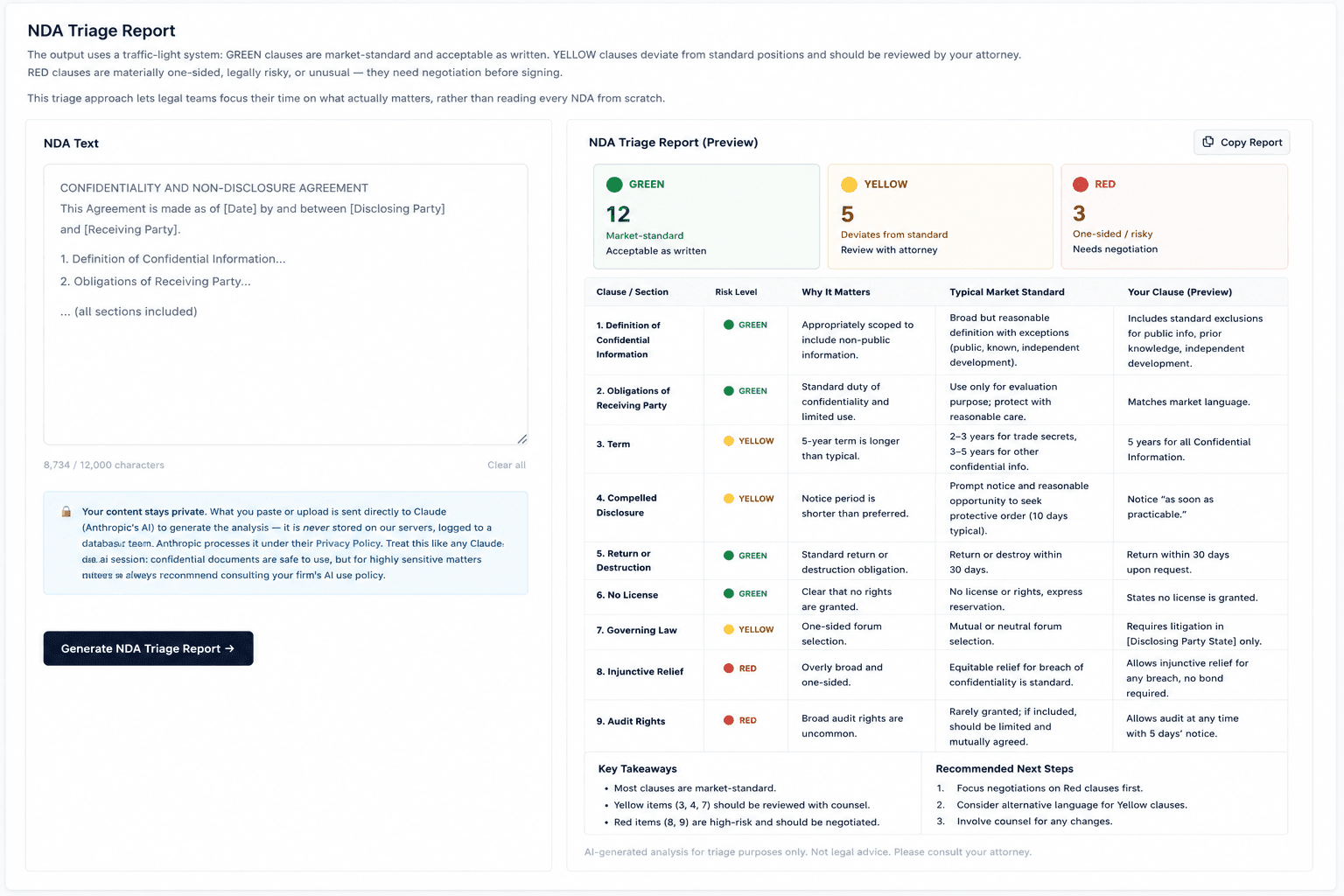
The output uses a traffic-light system: GREEN clauses are market-standard and acceptable as written. YELLOW clauses deviate from standard positions and should be reviewed by your attorney. RED clauses are materially one-sided, legally risky, or unusual — they need negotiation before signing. This triage approach lets legal teams focus their time on what actually matters, rather than reading every NDA from scratch.
The tool evaluates key NDA provisions including: the definition of confidential information, confidentiality obligations and carve-outs, the permitted use restriction, term and duration, return or destruction of materials, remedies (injunctive relief language), governing law and jurisdiction, and any non-solicitation provisions that may be embedded in the NDA.
This tool was adapted from Anthropic's open-source claude-for-legal commercial-legal skill library (Apache 2.0), so it applies the market-standard positions an in-house legal team would use. If you do not have a legal team, that is exactly the point: the triage tells you which provisions are normal and which are worth pushing back on before you sign. It is informational, not legal advice. Do not paste NDAs containing highly sensitive trade secrets or confidential business information.
Example Output
How to Use This Tool
- 1Paste the full NDA text into the input box — include all sections and definitions for the most complete triage
- 2Optionally note your role (disclosing party, receiving party, or mutual) to orient the risk analysis
- 3Click 'Generate NDA Triage Report' — the analysis takes 25–40 seconds for a complete NDA
- 4Review the clause-by-clause GREEN / YELLOW / RED assessment, share with your attorney, and focus negotiation on RED-flagged provisions
Who This Tool Is For
- ✓In-house legal teams triaging a high volume of incoming NDAs from vendors, partners, and customers
- ✓Freelancers and contractors asked to sign a client NDA before work begins
- ✓Job candidates handed an NDA during a hiring process, with no lawyer to ask
- ✓Startup founders reviewing NDAs received from potential investors, enterprise customers, or partners
- ✓Business development teams identifying which NDAs need attorney review versus which can be signed as-is
- ✓Outside counsel using triage output as a starting point for client NDA advice
- ✓Legal operations departments building consistent NDA review workflows
- ✓Procurement teams evaluating supplier confidentiality agreements
Frequently Asked Questions
What NDA provisions does the triage cover?
The triage covers: definition of confidential information, confidentiality obligations and carve-outs (legal requirement, public domain, independent development), permitted use restrictions, term and post-termination obligations, return/destruction of materials, remedies provisions, governing law, and any embedded non-solicitation clauses.
How does the GREEN / YELLOW / RED system work?
GREEN means the clause is market-standard and poses no unusual risk. YELLOW means it deviates from standard positions or is ambiguous — attorney review is recommended. RED means the clause is materially one-sided, legally risky, or unusual and should be negotiated before signing.
Can I use this for mutual NDAs, one-way NDAs, and employee NDAs?
Yes — the tool handles all common NDA types. For best results, note your role (disclosing party, receiving party, or mutual) in the input so the risk analysis is oriented to your position.
Does a GREEN rating mean I can sign without an attorney?
GREEN means a clause matches what is normal in the market — it does not mean the agreement is right for your situation. For a routine mutual NDA with nothing unusual flagged, most people reasonably sign on that basis. Get a lawyer involved when the stakes justify it: you are the disclosing party with trade secrets or key technology at risk, the NDA is attached to a significant deal, or anything came back YELLOW or RED.
Is this tool free?
You can run one free analysis per day before upgrading. Powered by Claude AI.