Legal Text Summarizer
Paste a clause, a paragraph, or a whole page of legal text and get it back in plain English — who the parties are, what they must do, what the deadlines are, and what to watch out for. Built for reading something you did not write.
Free to try — one analysis per day before upgrading. Outputs are legal information, not legal advice.
Drag & drop a file here, or click to browse
Your content stays private. What you paste or upload is sent directly to Claude (Anthropic's AI) to generate the analysis — it is never stored on our servers, logged to a database, or seen by our team. Anthropic processes it under their Privacy Policy. Do not submit confidential or highly sensitive information unless your organization's AI use policy permits it.
Legal information, not legal advice. This tool helps you understand your situation and prepare your next steps — it does not replace advice from a lawyer who knows your full circumstances. Verify anything important against official sources, and consult a licensed attorney before decisions with significant legal or financial consequences. Do not input confidential client information. Outputs are generated by Claude and may contain errors.
What Is the Legal Text Summarizer?
Legal writing is hard to read on purpose — long sentences, defined terms, and cross-references that assume you already know the vocabulary. That is a problem whether you are a tenant reading a lease clause, a founder reading an indemnity provision, or a paralegal working through an unfamiliar agreement. This tool takes a passage of legal text and gives it back in plain English.
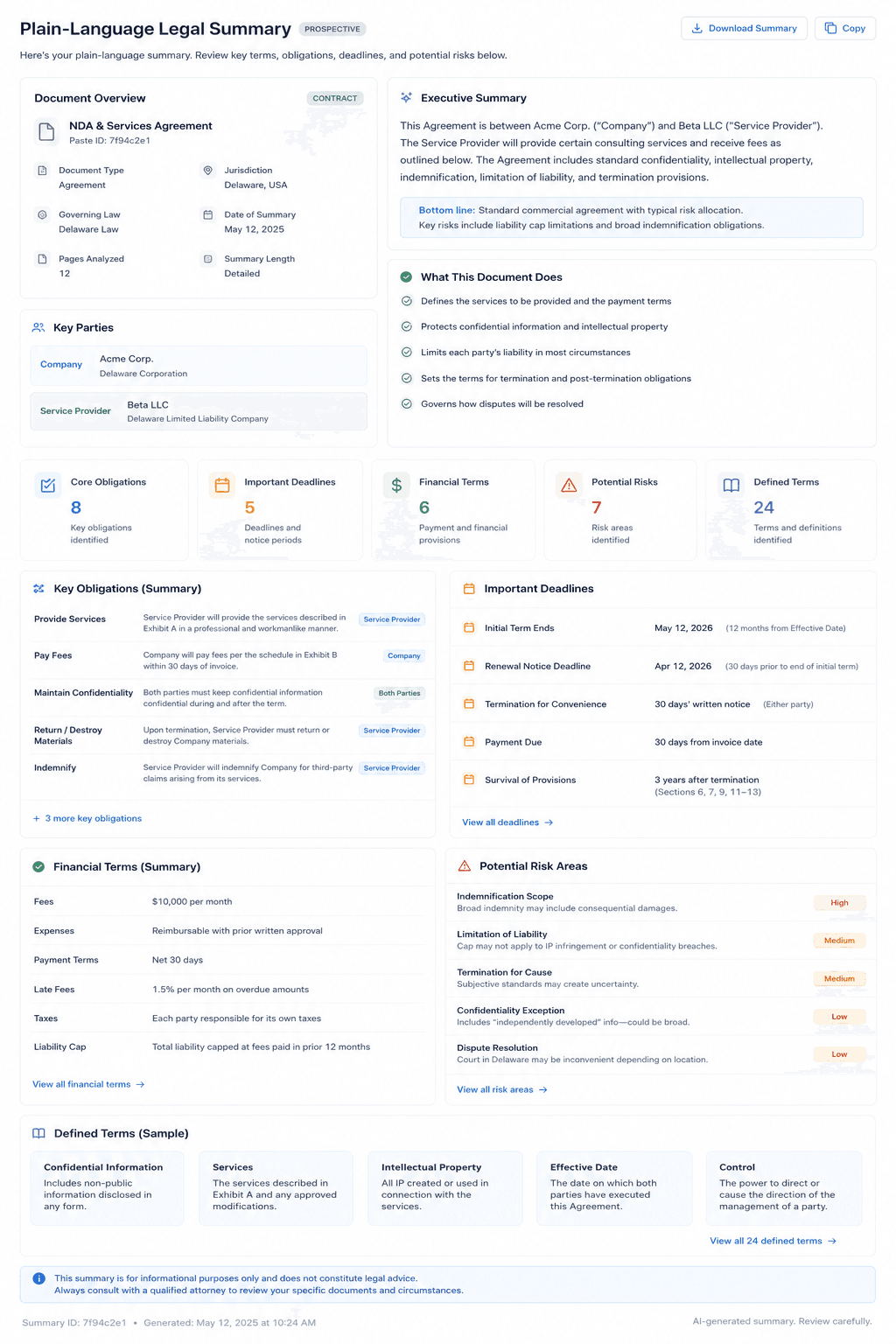
The tool works on any type of legal text: contract clauses and full agreements, court opinions and case law excerpts, federal and state statutes, regulatory guidance, legal correspondence, settlement terms, and more. It identifies key parties, core obligations, important deadlines, financial terms, and areas of potential risk — all presented in a structured, scannable format.
Unlike a generic AI summarizer, this tool is tuned specifically for legal content. It recognizes legally significant elements — defined terms, conditions precedent, limitation-of-liability caps, indemnification scope — that a general text summarizer would treat as ordinary prose. Every summary ends with the two or three things a non-lawyer should actually pay attention to, which is usually the part that matters most.
If you have a complete document rather than a passage — a full contract, motion, or agreement — the Legal Document Summarizer is the better fit: it produces an executive summary with parties, dates, and financial terms laid out in tables. Use this tool when you want a specific piece of text explained rather than a whole file inventoried. Either way, this is legal information, not legal advice, and you should not paste confidential client information.
Example Output
How to Use This Tool
- 1Paste your legal text into the input box — a contract clause, court opinion excerpt, statute section, or any legal document up to 12,000 characters
- 2Click 'Generate Plain-Language Summary' and allow 15–25 seconds for Claude to analyze the content
- 3Review the structured output: key parties, obligations, dates, financial terms, and risk flags are highlighted separately
- 4Copy the summary into your notes, or use it as the starting point for a question you want to ask — a landlord, an employer, the other side, or a lawyer
Who This Tool Is For
- ✓Tenants and homeowners working out what a lease or notice actually requires of them
- ✓Anyone handed a contract, severance agreement, or terms of service before signing it
- ✓Small business owners reading a vendor or client agreement without counsel on retainer
- ✓Associates and paralegals summarizing lengthy agreements before a client review meeting
- ✓In-house counsel triaging incoming vendor contracts to spot key obligations at a glance
- ✓Law students extracting holdings from judicial opinions for coursework
Frequently Asked Questions
What types of legal text can this tool summarize?
The tool works on contracts and clauses, court opinions, statutes, regulations, demand letters, settlement agreements, terms of service, privacy policies, and most other legal text in English. For best results, paste complete sections rather than sentence fragments.
Is my text kept private?
Do not paste confidential client information into this tool. Inputs are processed via Anthropic's Claude API and subject to Anthropic's data handling policies. Use this tool only for non-confidential, research, or educational purposes.
How accurate are the summaries?
Claude produces high-quality summaries for well-structured legal text, but AI can misread nuance and can be unaware of recent legal developments. Treat the summary as a reliable way to understand what a passage says, not as the final word on what it means for you. Check anything important against the original text, and get a lawyer involved when the stakes are high.
Is there a length limit on what I can paste?
Yes — the tool accepts up to 12,000 characters of input. For very long documents, paste the most important sections or clauses individually for the most accurate and focused analysis.
How is this different from using a general chatbot?
This tool uses a carefully engineered legal-specific prompt that consistently extracts the same categories of legally significant information on every run. A general chatbot will give you a different, less structured summary each time and may miss legally important elements.